

Table of Contents
Q4 2026 Release Notes
October - December 2026 · Work in progress
This quarter adds natural-language footage search, more detailed AI detections and counting, camera automations, and clearer storage health. Follow the linked guides for setup and full instructions.
Camera stream quality at a glance: The existing camera status details highlight stream quality problems with available packet loss and jitter readings. Routine and unavailable readings stay hidden.
Device status updates sent as JSON batches are accepted without Rails adding a conflicting empty device wrapper. Recovered camera authentication can replace an earlier rejected-credentials status.
Find Footage in Your Own Words
Describe the incident: Open Find footage on Events and search for something such as “a person wearing a red hat around noon”. Review the suggested locations, dates and detections before searching. Combine dates with daily hours, or dictate in supported browsers. See Natural Language Search.
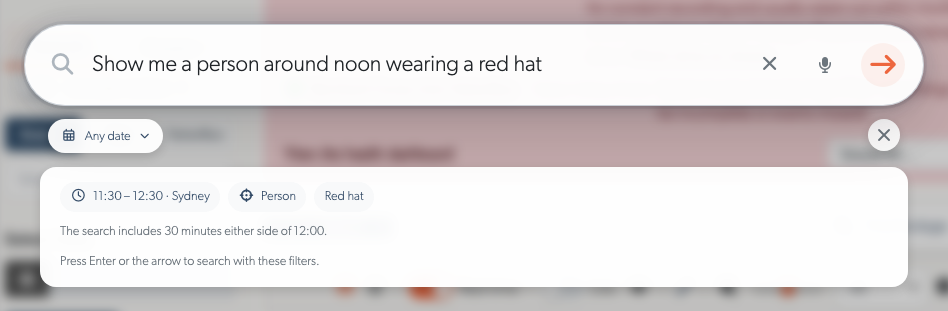
Search by place: Online recording cameras generate descriptions from a live image. Edit the description and keywords, or request an AI refresh, to help searches match places such as loading docks and service yards.
Clearer search progress: Events distinguishes a pending search from an empty result, explains timeouts, and adds newly matching events as they arrive. Appearance searches require the corresponding detections to have been recorded; they cannot add detail to older footage.
AI Detections and Counting
More precise appearance searches: TetherX AI distinguishes dogs, cats and birds, and cars, motorcycles, buses and trucks. Combine supported types with colours. Bicycles have their own search and counting class; a cyclist counts as a person and a bicycle, with no bicycle colour.
PPE and covered faces: Find people missing hi-vis or a hard hat, or with a covered face. People the AI cannot assess remain unassessed. These detections are off by default; contact TetherX support to enable them.
Vehicle trigger names: Car, Truck, Bus and Motorcycle each offer moving and stationary triggers. Vehicle selects all four types. The previous Vehicle trigger is renamed Car to reflect what it matched; check existing rule choices.
Counting charts: Compare entries and exits by class, drill from daily totals into shorter intervals, and filter by time, site, camera or line. Drag across the chart to focus on a period, with matching totals and CSV/Excel exports. Today's incomplete figures stay separate from completed daily totals. See People Counting.
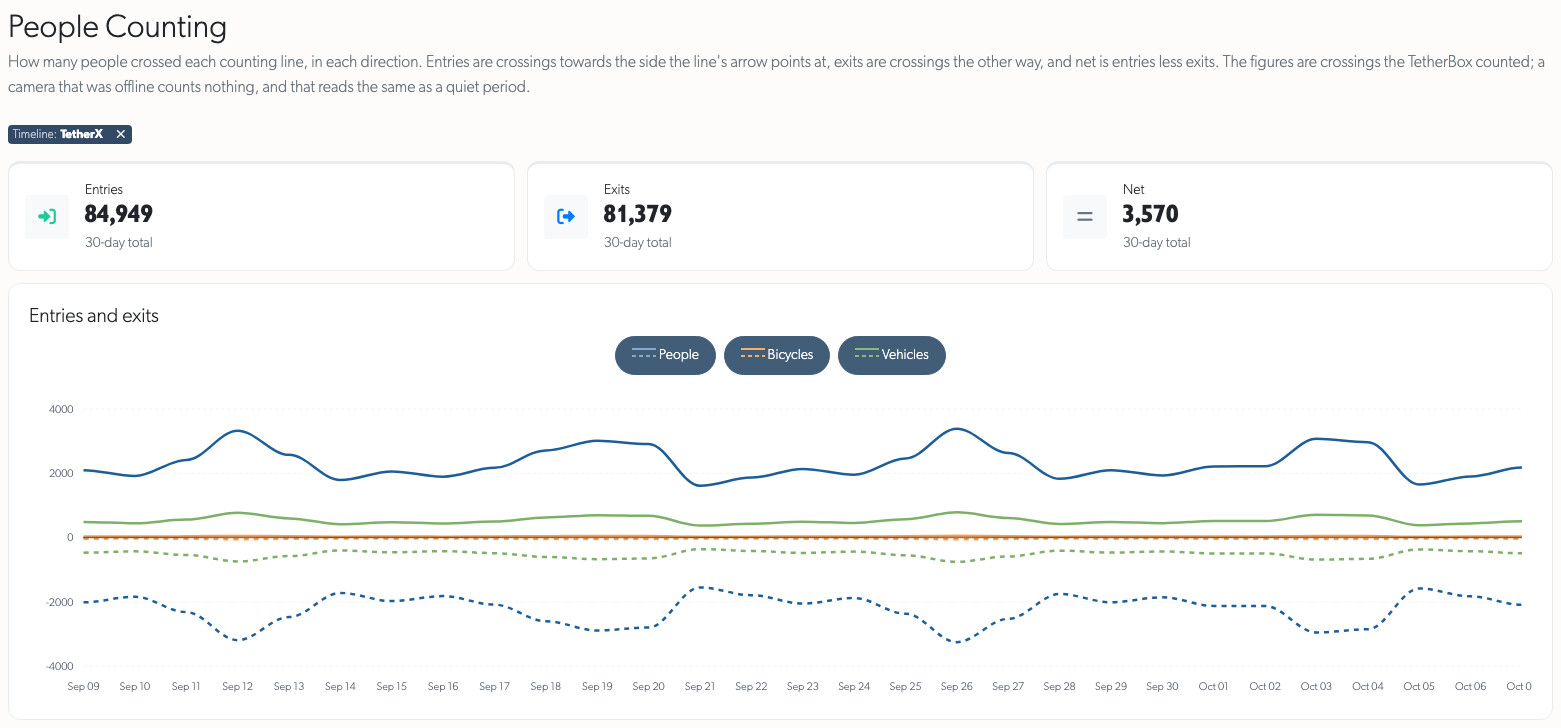
These detections require compatible TetherBox AI software. Camera status explains when an optional analytic is unavailable on the installed hardware and links to the relevant guide.
Camera Automations
Respond to activity in named areas: Automations and Rules can alert when a counter is unattended or a crowd forms. Draw regions, set thresholds and durations, choose active hours, then review notifications and equipment actions before saving.
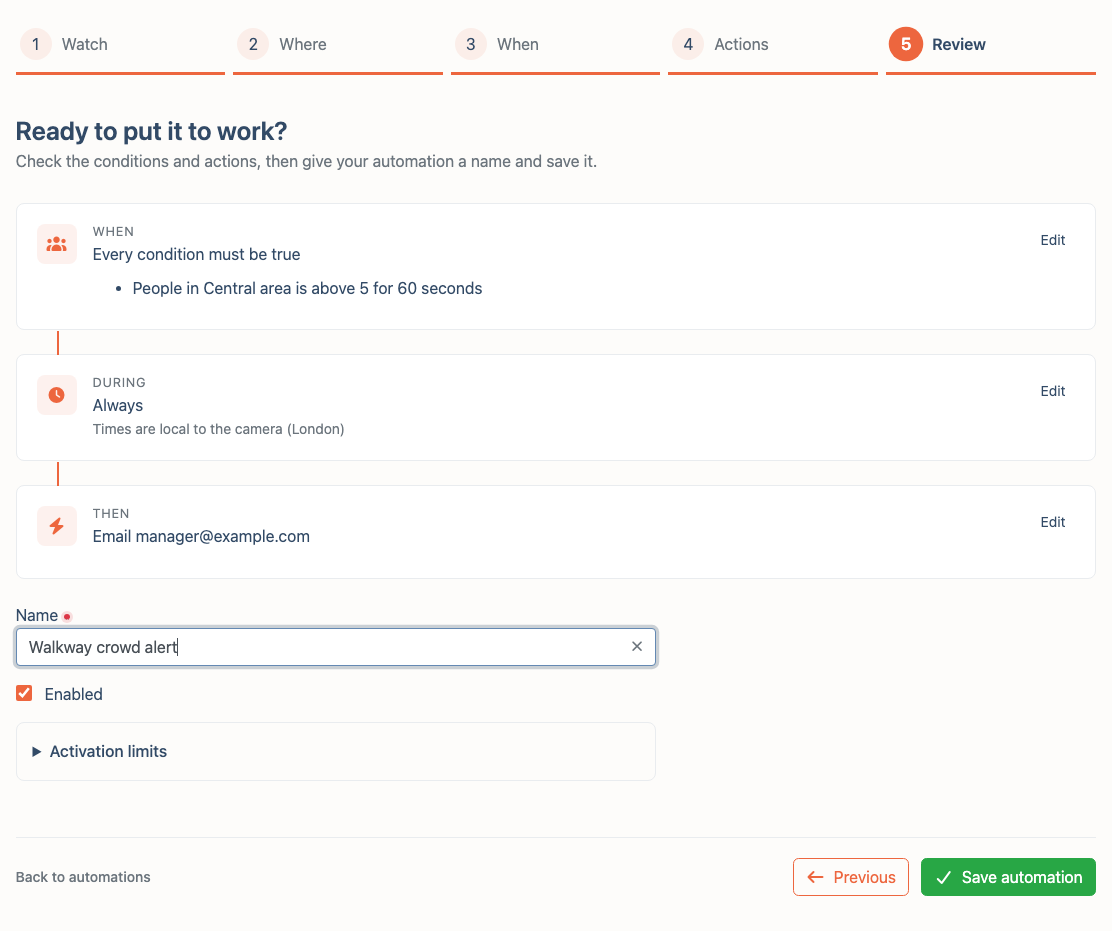
Choose the response: Send notifications or email, play recorded audio, activate PicoFlex outputs, or control supported camera sirens, strobes and lights. Garrison actions operate selected cameras at the same site. Explicit Off actions need no duration or recording and do not restore outputs when the rule clears.
Filter by enabled detections: Rules can count assessed PPE or covered faces and include both the matching count and total occupancy in alerts. Experimental weapon filters require matching version 4 automation support on the TetherBox and detector.
Experimental cleanliness checks: Staff can enable periodic checks for persistent litter, spills, overflowing bins or debris where the installed model supports them. Findings must persist for three checks before alerting; the rule's recipients, hours and activation limits still apply.
Automation setup is currently staff-only; contact TetherX support. Automations require TetherX AI, Only Monitor turned off, compatible TetherBox software and suitable equipment for output actions. Experimental weapon and cleanliness detection are opt-in; cleanliness checks run once a minute or less often.
Live View and Camera Controls
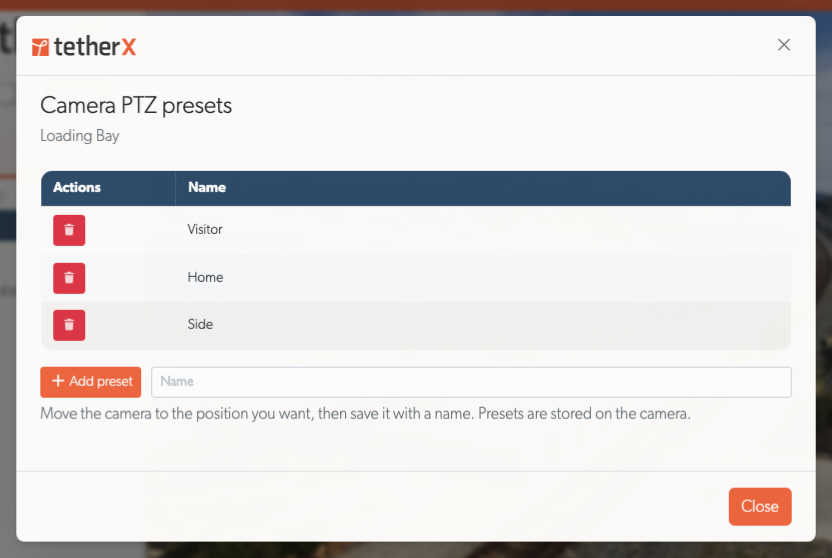
Manage camera PTZ presets: Save named camera positions and delete presets directly from the Live View preset menu. These positions are stored on the camera. See Live View.
Operate deterrents in context: Live View, fullscreen and the event operator console share Strobe, Siren and Relay controls. Manual Garrison activates supported sirens and strobes on permitted cameras at the event's site, with mixed states and individual failures reported. Talkdown remains separate. See Talkdown and the Monitoring Station Operator Guide.
Clearer control status: Compact panels show supported controls, explain unavailable features and command failures beside the affected control, and keep their layout stable while loading. Infrared lamps are labelled IR Light. Stop remains available for unknown or mixed output states.
Faster, steadier streaming: Supported remote cameras use low-latency streaming with automatic fallback; compatible local TetherBoxes can connect directly. Recovery retains the last picture, and fullscreen or quality changes preserve zoom and audio choices. Stream details identify the active transport and quality.
Walls and saved views: Fullscreen layout fills the display with the camera grid while retaining controls and an exit button. Preset groups can be renamed and deleted across All timelines and retain their grouping after refresh. Deleted cameras have a clear removal action.
Notes for operators: Accounts with notes-viewing permission can read notes in Live View, event details and record pages. Granting reading access does not grant editing; staff-only notes remain restricted.
Direct local streaming requires compatible TetherBox software. Camera walls apply access changes, schedules and browser sign-outs within one minute.
TetherBox Storage and Health
A consistent health picture: TetherBox lists, Storage, Drives, the Health Dashboard and Health Report show matching findings. Fleet issue totals include the full filtered list, and badges explain recording problems and where to investigate them.
Understand drive warnings: Storage brings drive health, USB details, partitions and RAID recovery together. It distinguishes ejected, unplugged, missing and unreadable drives, including unreadable disk sectors. Hard disk age and rejected NVMe diagnostic commands alone do not raise hardware-fault warnings; genuine faults and SSD wear remain visible.
Review AI health insights: Drive assessments use the same findings as the health badge and distinguish usage counters from faults. Failed or empty analyses preserve the previous result and explain the error. See Recording Storage.

Act on unused drives: Review why a drive is unused and format eligible drives from Health. Format explains blockers such as read errors, checks in progress or a suspected fault. RAID members and drives that may contain ext4 or btrfs footage are protected from reformatting.
Recover unresponsive USB drives: Compatible TetherBoxes restart a stalled drive's USB connection and remount it when it returns with the same filesystem. Storage, Health and report emails show whether recovery succeeded or an on-site reconnection is needed. USB commands complete or report a timeout within 45 seconds.
Set up blank storage automatically: Compatible TetherBoxes format drives confirmed completely blank. Existing data, previous filesystems, health warnings and the system disk prevent automatic formatting; the outcome appears in Storage and health reports.
Clearer unit management: Network details use consistent LAN numbering and Mbps rates. New units and sites start with regional timezones on the Australia, North America and India clouds; existing choices remain unchanged. Disabling a compatible TetherBox stops camera streaming and device monitoring as well as platform playback.
RAID reporting, USB recovery, automatic blank-drive setup and stopping monitoring on disabled units require compatible TetherBox software. See Storage Hardware Recommendations for drive selection and Replacing a TetherBox Drive for replacement steps.
Camera Settings, Accounts and Help
Camera settings for administrators and integrators: Accounts that can manage a camera can edit supported video, audio and picture controls under API → Settings. Shared audio encoders have one editor, preventing another stream's unchanged values from overwriting an edit. See Camera API Tab and Manual Camera Configuration.
Camera configuration: Secondary streams prefer H.264 Main when available for smoother playback. Camera lists can filter by TetherX AI enabled or disabled, and credential failures show relevant guidance. See Automatic Configuration.
Faster account changes: Local account access updates reach compatible TetherBoxes within seconds. Account and device changes are confirmed by the TetherBox, with refused or unanswered changes retried. Removed or deactivated accounts lose local sign-in access.
Help by task: The Frequently Asked Questions groups related answers and adds a page filter, with guidance on bulk downloads, retention, drive faults, TetherBox AI and SSO services. Local Streaming provides a shorter connection checklist and links to the offline-interface instructions. User Guide, Integrator Guide and Operator Guide collect relevant instructions, with partner tools grouped separately in the help menu.
Languages and smaller screens: Italian joins the language menu for screens, emails and messages; help articles remain in English. More navigation exposes additional permitted pages on small screens, and long dialogs keep Save and Apply accessible. Alert and account emails have clearer primary actions. Help icons stay beside their labels across settings, accounts and activation forms.
Integrations and API Changes
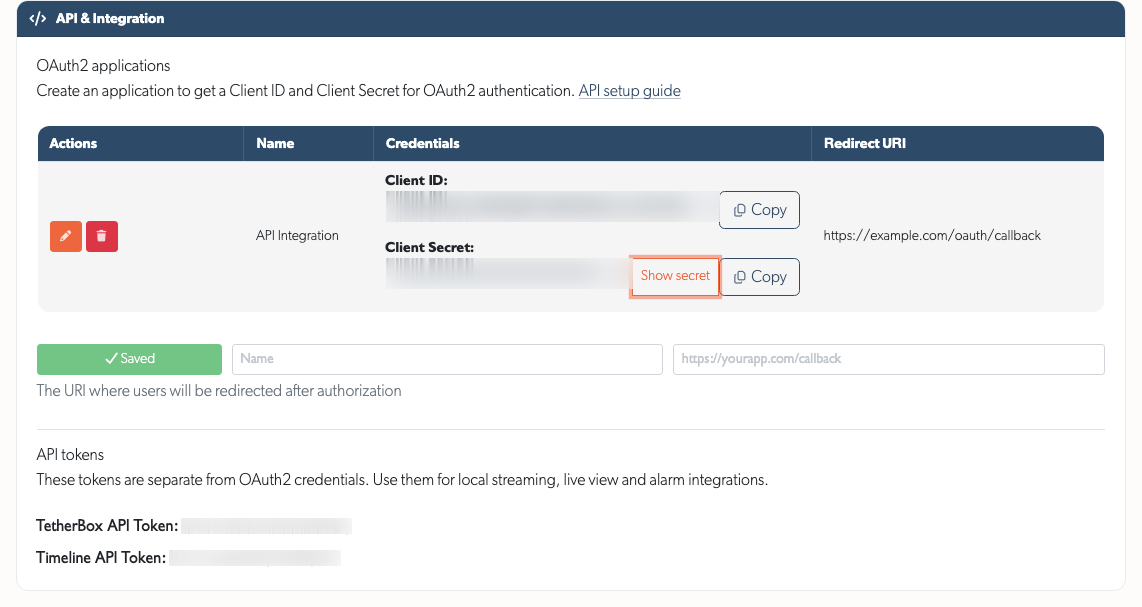
OAuth2 credentials: API Details separates applications from API tokens, with Client ID, a hidden Client Secret and Copy buttons. Authorised accounts can create applications without an assigned company. See API Getting Started.
AI results: Event responses include recorded hi-vis, hard-hat and face-covering assessments. Zone analytics adds
hard_hatalongsidehelmet, distinguishing construction hard hats from cycle and motorcycle helmets; unassessed people remain unassessed.PicoFlex inputs: Each input has an alert cooldown. Digital inputs default to every activation; analogue inputs default to four hours. Panic, duress, medical, flood, fire and gas alerts bypass camera arming and recording schedules. Requires compatible TetherBox software. See MicroChip.
Patriot Systems: Alarms link to the full TetherX event. Observed, No Action Taken and Report Sent, including cleared selections, reach Patriot as operator notes.
Reliability Improvements
- Playback: iPhone Safari's Tap to play recovers blocked autoplay, bursty camera audio plays reliably, and live streams reconnect without overlapping error messages. Scrubbing preserves audio, while missing or temporarily unavailable event footage shows the appropriate empty state.
- Schedules and drawings: Full-day and overnight rules retain their meaning when reopened, typed times keep their values, and invalid schedules, automation regions, masks and counting lines explain corrections while preserving saved settings. See Camera Recording Schedule and Camera Masking.
- Forms and live updates: Open popovers, unsaved edits and entered names survive background updates or failed saves. Actions show progress and completion, explain errors beside the control or field, and remain available for retry without repeated dialogs.
- Access and sign-in: Site restrictions apply consistently to footage, real-time updates, exports and attachments. Queued moves and deletions recheck permissions. Google sign-in offers account selection; activation emails include a copyable link.
- Record pages and reports: Missing timelines, sites or comment authors no longer break details or create misleading links. Footage-gap cameras appear once in health reports, and Storage retains its scroll position during reconnection. Sorting a table marks the chosen column straight away and keeps the table scrolled to the same columns, however long the results take.
- Platform availability: Routine updates keep pages responding and device messages arriving. TetherBoxes can receive browser certificates after moves between regional clouds. Failed requests include useful support references.