

Table of Contents
Professional Monitoring
Every site on TetherX records, detects and raises events for you to review. A professionally monitored site does something further: its detections go to a trained operator, who looks at the camera while the person is still on your property and acts on what they see.
TetherX is an alarm receiving centre in its own right. Its operators do the monitoring, on the same event console you can see yourself. A detection reaches a TetherX operator, and nothing else has to be connected for that to happen: a site with no other integration is fully monitored.
If you already work with another monitoring provider, a site can also have its detections forwarded to your external control room, such as Patriot, Immix, HikCentral or Manitou. That is an addition to the monitoring, not a substitute for it and not a requirement of it. See Control Room Software Integration for the platforms a site can forward to and how each one is set up.
Those are the two destinations, and the rest of this article and the Monitored Hours screen name both: a detection reaches a TetherX operator, and it is forwarded to your external control room where the site is set up for it.
The Monitored Hours panel on a site says which of these applies. If it says No professional monitoring, nobody is monitoring that site: nothing reaches a TetherX operator and nothing is forwarded to an external control room either. You still have the footage, the events and the alerts; nobody is called out.
Tip: Professional monitoring is arranged through your integrator, not switched on from this screen. They set the site up for monitoring, add any forwarding to your external control room, and agree the hours and the response with you. Contact them to discuss it.
What an operator does
An operator opens the event within seconds of the detection, with the recording already in front of them and your site's notes beside it.
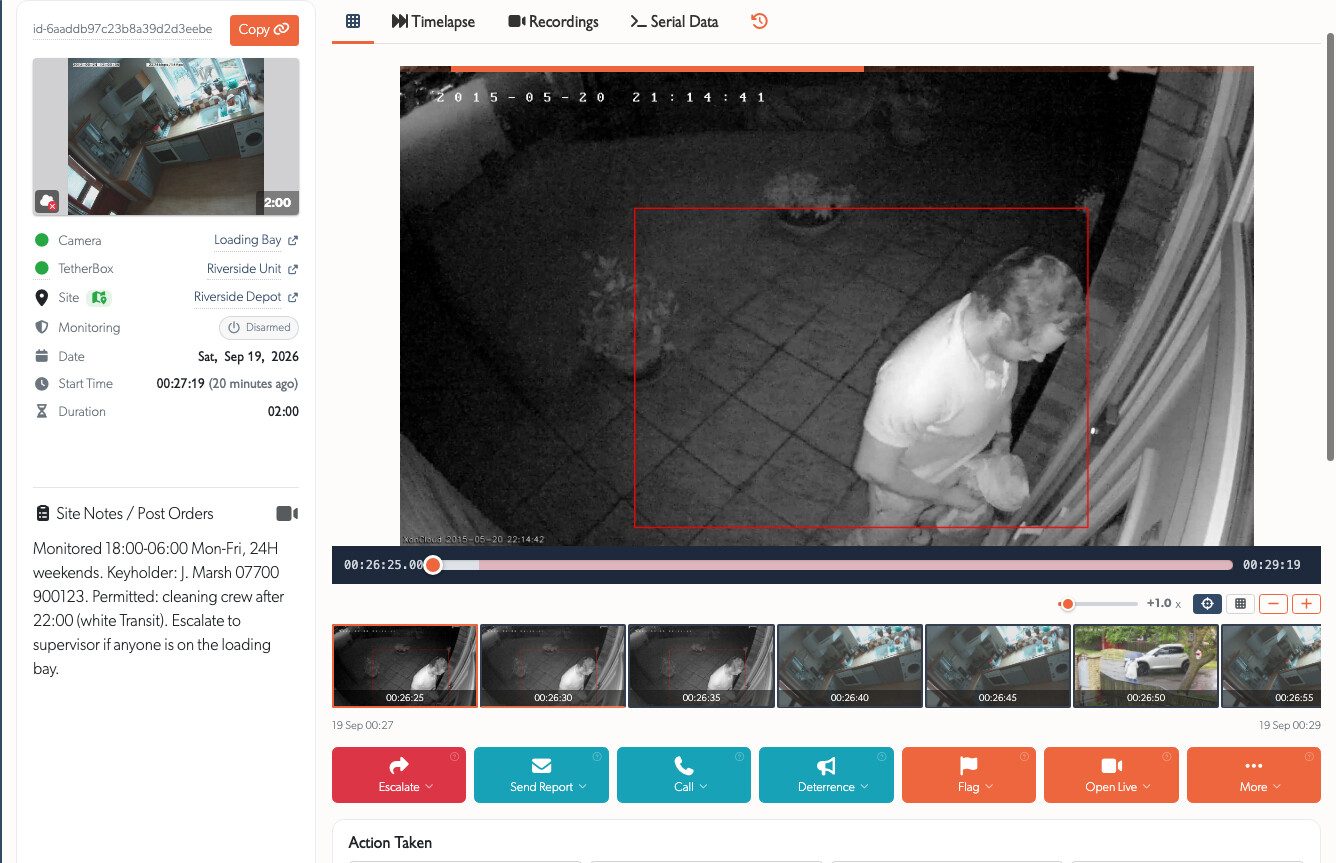
From that one screen they can act while the event is still live.

- Active deterrence - sound the siren or strobe, play a pre-recorded warning, or speak directly to the person on site over the camera. Most intruders leave at the sound of a voice that names what they are wearing.
- Call your contacts - the keyholder list you keep on the site, in the order you set.
- Call the emergency services - and, because an operator has watched the footage, the call is a verified one rather than a bare alarm. The operator records on the event that services were dispatched, and again when they arrive, so you can read both afterwards.
- Send you a report with the clip attached, whether or not anything came of it.
- Escalate to a supervisor when a decision needs one.
Everything the operator did is recorded against the event, so the morning after you can read what happened and watch the same footage they watched.
Tip: A bare alarm signal no longer rolls a police car under verified response policies in most regions. An operator who has seen the intruder is what makes the call a verified one.
Monitoring does not have to be all the time
A monitored site is rarely monitored around the clock. Most are watched when the premises are empty: overnight, at weekends, or outside trading hours. That pattern is set per site under Monitored Hours, along with the dates that replace it for a bank holiday or a shutdown week.
Outside those hours your cameras carry on recording and events are still raised for you to review. What stops is anybody acting on them: the detection does not reach a TetherX operator and it is not forwarded to your external control room either. Set the hours to cover the times your site should be watched, because a gap in them is a gap in the response.
Common questions
Does this cost more? Yes. Somebody is watching your site, so professional monitoring is a service your integrator charges for. They will quote on the hours you want covered and the response you want.
Can I try it on one site? Yes. Monitoring is arranged per site, so a single high-risk yard or entrance can be monitored while the rest of the estate is not.
Who sees my cameras? Only the operators assigned to your site, and only the cameras you put on the schedule. Every view an operator opens is recorded in the Audit Log.
Do I need my own control room for this? No. TetherX is the alarm receiving centre, so nothing else has to be arranged.
What if I already have a monitoring provider? Keep them. A site can have its detections forwarded to your external control room as well, so the same detections reach both. See Control Room Software Integration for the platforms TetherX feeds, and send your provider's name to your integrator.
Related
- Monitored Hours - when a monitored site's detections are sent
- Control Room Software Integration - the external platforms a site can forward to as well
- Control Rooms - how an operator works a site on the TetherX console
- Monitoring Station Operator Guide - the workflow an operator follows
- Questions to Ask Your Security System Supplier - where monitoring fits in a whole system
Referenced in: