

Table of Contents
Hanwha / Wisenet / Samsung Setup
This guide covers setup for Hanwha Techwin, Wisenet, and Samsung cameras, NVRs, and DVRs.
Profile Configuration
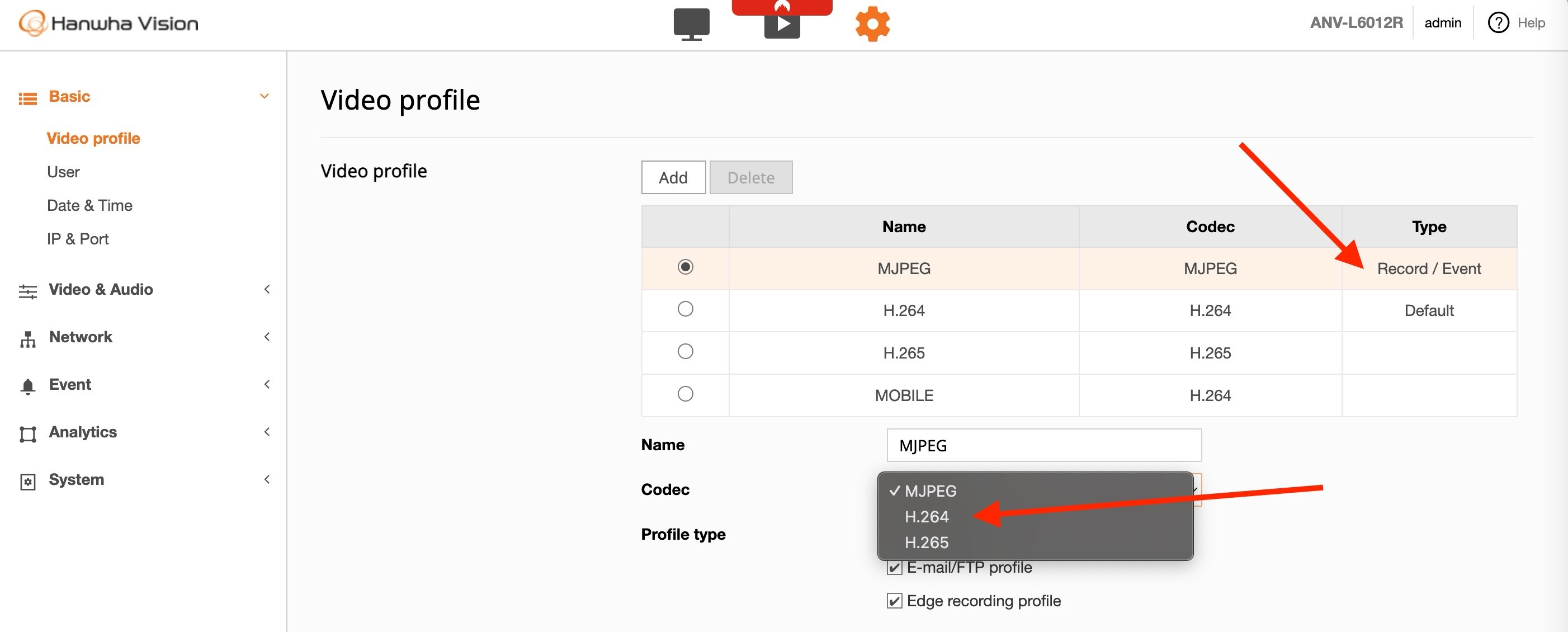
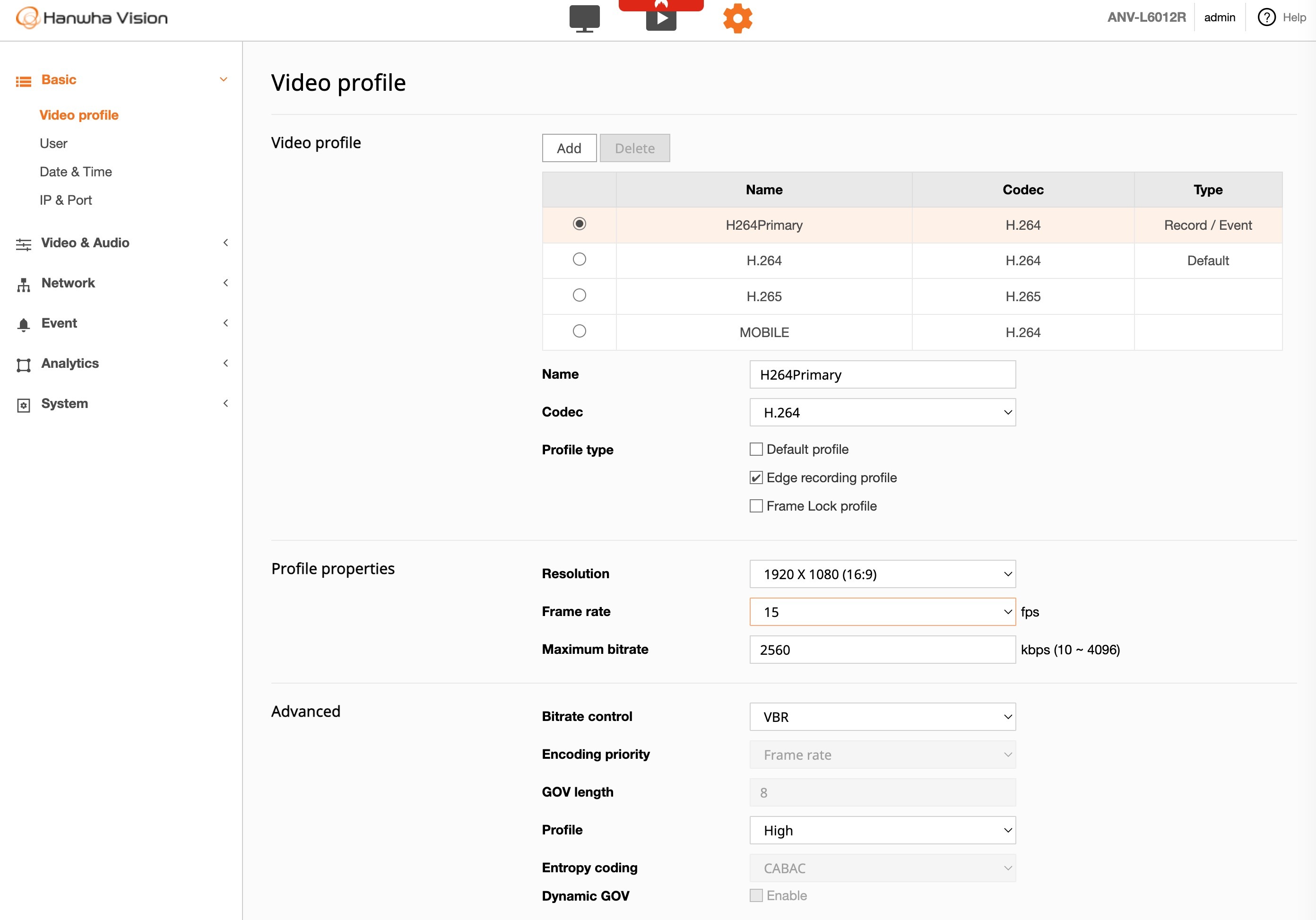
Configure two profiles on your device:
| Profile | Purpose | Settings |
|---|---|---|
| Event / Recording | Stored footage | High resolution, higher frame rate |
| Live / Default | Live view and analytics | 720p, 10 fps |
Warning: Some cameras have the Event/Recording profile set to MJPEG by default. You must change this to H.264 or H.265 for TetherX compatibility.
Once configured correctly, your profiles should look like this:
IP Cameras
IP cameras should work out of the box. If you experience issues, configure the stream paths manually:
| Setting | Path |
|---|---|
| Analytics Path | /profile2/media.smp |
| Recording Path | /profile1/media.smp |
This assumes:
- Profile 1 is set to maximum resolution/frame rate (recording)
- Profile 2 is set to 720p 15fps (analytics)
Ensure the RTSP port is correct (554 by default).
Multi-Sensor Cameras & Encoders
For multi-sensor cameras or encoders, add the sensor number to the path. Sensor numbering starts at 0.
| Sensor | Analytics Path |
|---|---|
| Sensor 1 | /0/profile2/media.smp |
| Sensor 2 | /1/profile2/media.smp |
| Sensor 3 | /2/profile2/media.smp |
| Sensor 4 | /3/profile2/media.smp |
Compatible models include: PNM-9081VQ, PNM-9080VQ, PNM-9322VQP, PNM-9002VQ, PNM-7002VD
NVR (Network Video Recorders)
RTSP Port
The RTSP port is the last port in the Device Port range. For example, if Device Port is set to 554-558, the RTSP port is 558.
Stream Paths
Channel numbering starts at 0:
| Setting | Path | Example (Channel 1) |
|---|---|---|
| Analytics Path | /LiveChannel/<channel>/media.smp |
/LiveChannel/0/media.smp |
| Recording Path | /RecordChannel/<channel>/media.smp |
/RecordChannel/0/media.smp |
Verifying Profile Mappings
To check which profiles are assigned to each channel, tunnel to the device and visit, using the host and port the tunnel gives you:
http://TUNNEL-HOST:TUNNEL-PORT/stw-cgi/media.cgi?msubmenu=videoprofilepolicy&action=view
You'll see output like:
Channel.0.NetworkProfile=2
Channel.0.LiveProfile=2
Channel.0.RecordProfile=2
Channel.0.LiveMode=Manual
Ensure the Live and Record profiles are mapped to the desired resolution, frame rate, and codec.
DVR (Digital Video Recorders)
DVR setup is similar to NVR with these differences:
RTSP Port
The RTSP port is the last port in the Device Port range. For example, if Device Port is set to 4520-4524, the RTSP port is 4524.
Stream Path
| Setting | Path |
|---|---|
| Analytics Path | /<camera> |
Troubleshooting
If you have issues following this guide, contact support via the live chat in TetherX.
Referenced in: